Plan App Store metadata within Apple’s character limits
Draft your app name, subtitle and keyword field, see the limits live, and compare versions before you publish.
What the metadata editor is
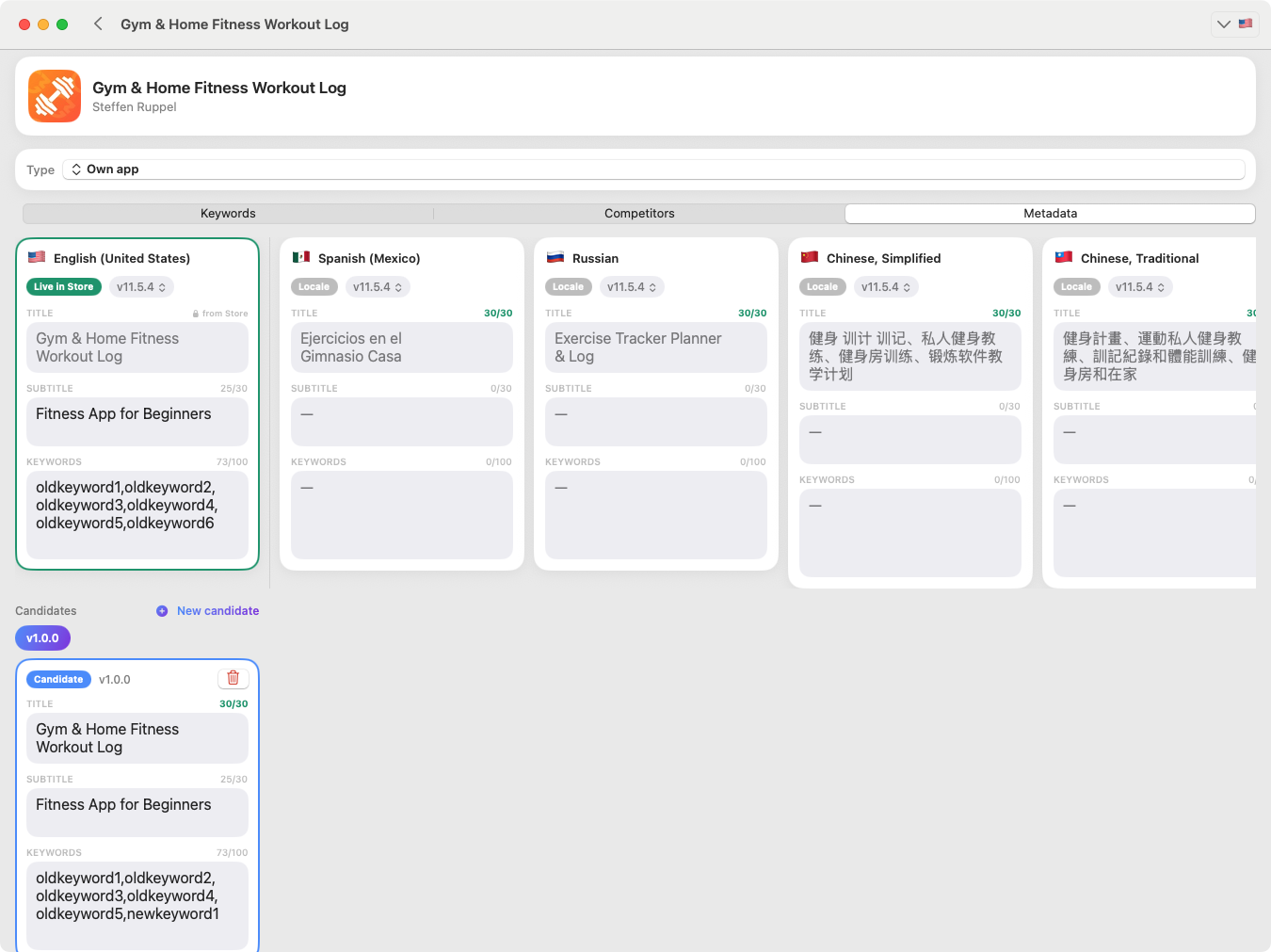
The metadata editor is where you plan the Apple App Store metadata that influences search: the app name (title), the subtitle and the keyword field. You prepare, analyse and compare changes in KWRDS, then enter the final version yourself in App Store Connect.
Why it helps
- Plan name, subtitle and keyword field with the real Apple character limits in view.
- Compare drafts before committing to a change.
- Use your character budget deliberately instead of guessing.
- Keep metadata organised per app and per storefront.
How it works
- 1
Open your app’s metadata
Pick the app and the storefront you are planning for.
- 2
Draft the fields
Write the app name, subtitle and keyword field with live character counters.
- 3
Analyse and compare
Review how the draft uses your available characters and compare versions.
- 4
Apply in App Store Connect
When you are happy, enter the final metadata yourself in App Store Connect.
A realistic example
You plan an app name of 27 of 30 characters, a subtitle of 29 of 30, and a keyword field at 96 of 100. The counters show exactly how much room is left, so you can decide whether one more keyword fits — before anything goes live.
Good to know
KWRDS does not transfer or publish metadata to App Store Connect — it is a planning and analysis tool, and you apply changes yourself. The Apple limits are 30 characters for the app name, 30 for the subtitle and 100 for the keyword field. Keywords planned here are not counted against the ranking-tracking limit.
FAQ
Which metadata can I plan with KWRDS?
The metadata editor lets you plan the App Store app name (title), the subtitle and the keyword field. You can prepare, analyse and compare changes before entering them yourself in App Store Connect.
Are the Apple App Store character limits taken into account?
Yes. The editor respects and shows the Apple App Store character limits — 30 characters for the app name, 30 for the subtitle and 100 for the keyword field — so you can see how much space you have while you plan.
Are changes pushed to App Store Connect automatically?
No. KWRDS does not transfer or publish metadata to App Store Connect. It is a planning and analysis tool — you apply the prepared changes yourself in App Store Connect.
Are keywords in the metadata editor limited too?
No. Keywords you plan, analyse or manage in the metadata editor are not counted against the ranking-tracking limit. The two are separate: the limit applies to tracked ranking keywords, not to metadata keywords.
Related
Ready to optimise your keywords?
Download KWRDS and use keyword tracking, research, competitors and metadata in one native Apple app.
For iPhone, iPad and Mac. Apple App Store only.