Cross-localization: cover more keywords without repeating words
See which keywords are already covered by other localizations in a storefront — and put your remaining characters to better use.
What cross-localization means
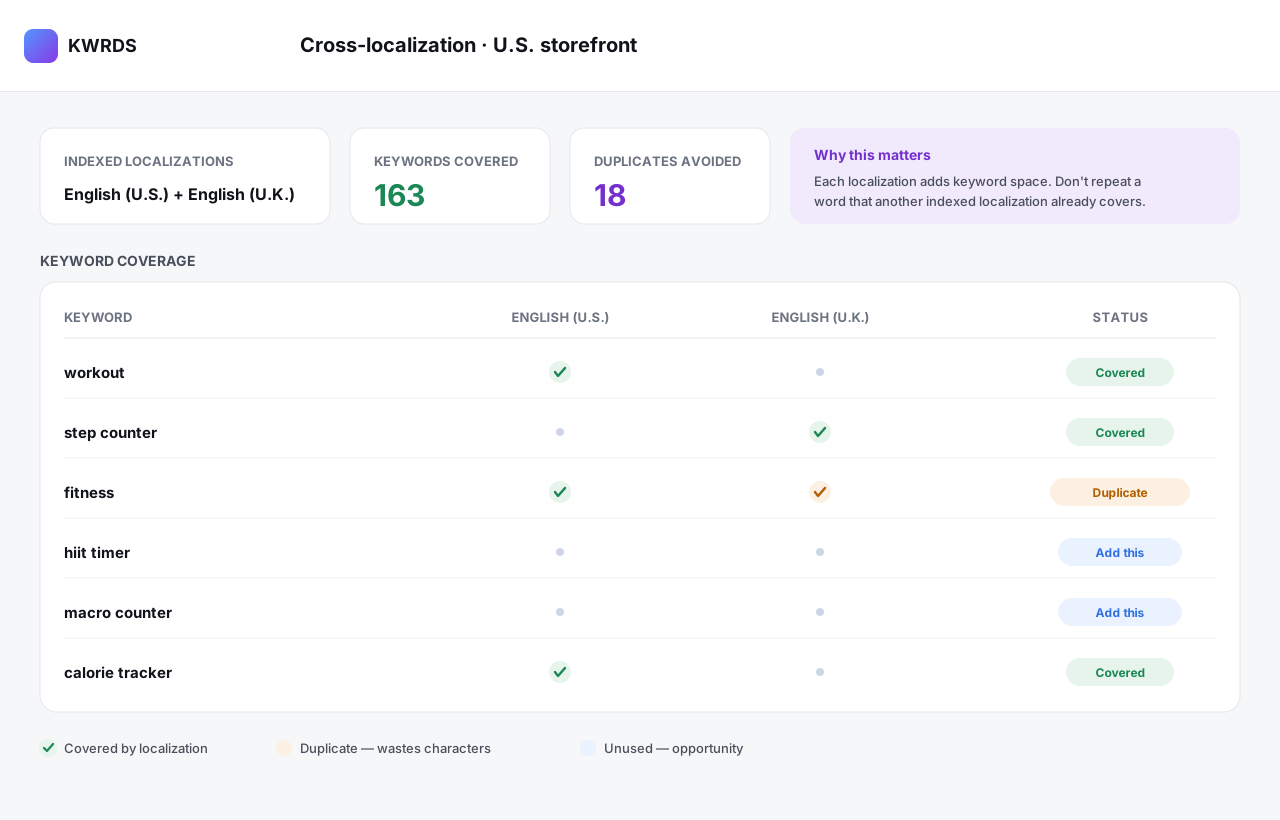
In a single Apple App Store storefront, search can index keywords from more than one localization. Cross-localization is the practice of using additional localizations so their keywords also count in that storefront. The metadata editor in KWRDS applies these rules and shows which keywords are already covered and which are still unused.
Why it helps
- Avoid spending characters on a keyword another localization already covers.
- Discover keyword space you did not realise you had.
- Use the full set of indexed localizations for a storefront deliberately.
- Plan international metadata without accidental duplication.
How it works
- 1
Pick a storefront
Choose the storefront you are optimising, e.g. the United States.
- 2
See covered keywords
KWRDS shows which keywords the indexed localizations already cover.
- 3
Spot duplicates and gaps
Duplicates that waste characters are flagged; unused keywords are highlighted as opportunities.
- 4
Fill the gaps
Add the missing keywords instead of repeating ones you already cover.
A realistic example
In the United States storefront, the App Store can index both the English (U.S.) and English (U.K.) localizations. If “fitness” already sits in both, repeating it wastes characters. KWRDS flags that duplicate and suggests using the freed space for an uncovered keyword like “hiit timer”.
Good to know
Which localizations are indexed for a storefront, and how, is defined by Apple — and Apple can change these rules. KWRDS reflects the cross-localization rules in the editor; always confirm current behaviour against Apple’s official documentation.
FAQ
What does cross-localization mean in the Apple App Store?
In a single storefront, the Apple App Store can index keywords from more than one localization. Cross-localization means using additional localizations so their keywords also count in that storefront — which expands the keywords you cover without repeating words. KWRDS shows which keywords are already covered by other relevant localizations and which are still unused.
Are keywords in the metadata editor limited too?
No. Keywords you plan, analyse or manage in the metadata editor are not counted against the ranking-tracking limit. The two are separate: the limit applies to tracked ranking keywords, not to metadata keywords.
Related
Ready to optimise your keywords?
Download KWRDS and use keyword tracking, research, competitors and metadata in one native Apple app.
For iPhone, iPad and Mac. Apple App Store only.